
INTERNET SPEED
and why it matters
Think of Internet speed, or bandwidth, as traffic on a highway. Each device in your home can be considered a car on the road, and each “car,” or device, causes increased congestion. The higher your bandwidth (Internet speed), the more open lanes, causing traffic to flow more freely. Think about this: How many devices have you added to your network since you signed up with Wheat State Technologies? How many devices have you added to your network in the last year alone?
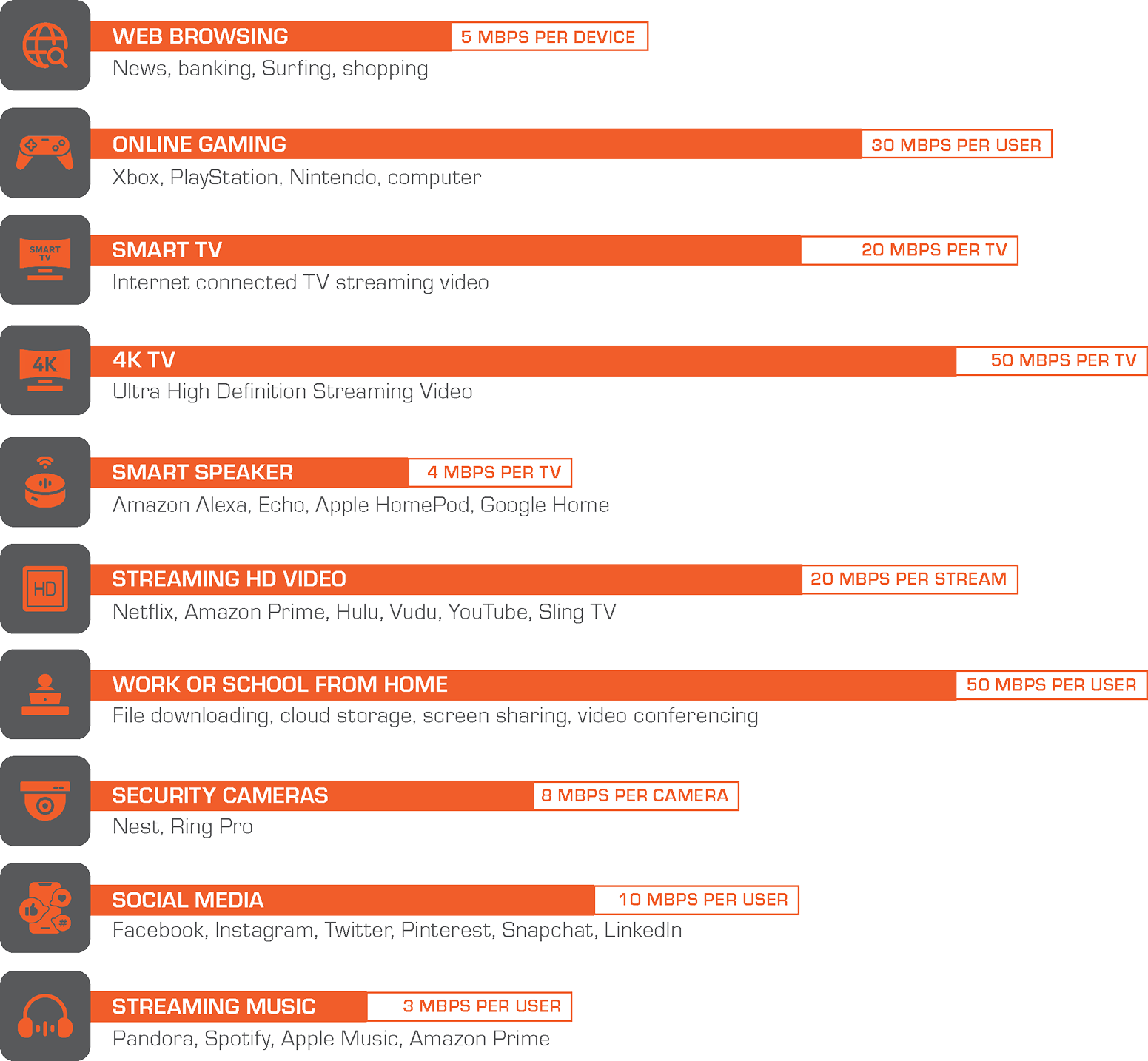
So… How much speed is actually consumed? Find out below for some common Internet activities
Download Speeds
HOW TO USE THE BANDWIDTH CALCULATOR
**Allocations are based on average consumption for common Internet functions. Specific usage may vary depending on the number of devices, device health, consumer behavior and other unique situations within the home or business.**
CLASSIC WI-FI INTERNET
50/50Mbps
$49.99/mo
Ideal plan for 1-2 person households and up to 5 devices. Stream an HD movie and pay bills online simultaneously.
MOVIES & eGAMING WI-FI INTERNET
100/100Mbps
$ 79.99/mo
EDUCATION WI-FI INTERNET
250/250Mbps
$89.99/mo
Ideal for households with 4–6 people. Up to 10 connected devices. Good for online teachers or students plus security cameras, and Wi-Fi devices.
WORK FROM HOME WI-FI INTERNET
500/500Mbps
$99.99/mo
SMART HOME WI-FI INTERNET
1Gig/1Gig
$139.99/mo
If your household relies on internet for eGaming, streaming movies, for school, work, Wi-Fi enabled smart appliances, doorbells and security cameras, plus still supporting your household’s many other Wi-Fi enabled devices.
UNDERSTANDING RESULTS
Testing the speed of your internet connection is easy, but it’s also easy to misunderstand the results. Your devices — TVs, routers, smartphones, laptops, desktops, etc. — have different capabilities, and you can get different results on each one, even while using the same internet connection.
Here are a few things to keep in mind when evaluating your speed test results:
HARD-WIRED VS. WIRELESS
That old-school cord-and-plug is simply more reliable than Wi-Fi (wireless) connectivity. Even those super-fast 1 Gbps connections, now widely available across the country, won’t test out at higher than 500 to 700 Mbps when tested over Wi-Fi. For the most accurate speed test result you must test with a hard-wired device. Why? Because there are nearly endless variables that can negatively affect a Wi-Fi signal, everything from nearby construction or the wireless printer in the home office to a baby monitor or a home microwave in use.
POSSIBLE PROBLEMS AFFECTING SPEED AND SPEED TESTS
Slow internet speeds are sometimes caused by malware such as adware and viruses. If you feel you have been affected, please reach out to WST (Wheat State Technologies) for advice on how to handle this type of intrusion. It’s very easy to overlook any ongoing downloads or programs like video chat that may be turned on while you’re conducting a speed test on your device. Close these applications, reboot your device, and test again. Even the browser you use — Chrome, Firefox, Safari, Microsoft Edge, etc. — can affect your test speed. Try different browsers to see if that’s the case on your system. If you have a Wi-Fi extender, make sure you turn it off before you run a speed test. Otherwise, your computer may test the wrong connection.
EQUIPMENT
Technology advances constantly, and many older routers and computers simply cannot take full advantage of the blazing speed and bandwidth of today’s broadband connectivity. WST has some of the highest-rated equipment on the market, so please discuss your options with our CSR team or your install technician if you have any questions. When you’re ready to upgrade your technology, make sure your new equipment has the internal processing power that can leverage the speed of market-leading fiber broadband like that from WST.